The question: How do I make an AI presentation that doesn't look like a template?
AI presentations that don’t look like templates
In this article
To stop an AI presentation looking like a template, the style is not picked from a list: it is generated. First three or four sample slides come out of an image model such as GPT Image 2.5, you pick the one with the feel you want, and the deck is built in code taking its cue from it, with your colours and your logo on top. In Aura Studio Aura walks you through it, and the deck comes out editable, as PDF and as PowerPoint.
Every AI presentation looks alike because the taste comes from a list of typefaces and palettes. Taste does not fit in a form: you recognise it when you see it.
The method: choose by looking, not by describing
- Directions. Aura writes three or four distinct directions for your deck: light, type, composition, mood. Writing them costs nothing.
- Sample slides. Each direction is painted as a real slide, with a placeholder headline, in a single batch: 5 credits per slide with GPT Image 2.5 Flare.
- You pick one. The one with the right feel. You see them in the chat, as images, not as a list.
- Aura looks at the chosen one and builds. It reads the colour, the contrast, the type scale and how the page breathes from the image, and carries it into the deck in code.


The three rules that prevent the usual failures
- Not a single word is inherited from the sample. Its headline is a placeholder, there to show how the type sits. The text of your deck is yours.
- Your brand colour wins. Colours in a generated image are tinted by the light of the scene. What is taken from the sample is the paper and the dark; the accent is yours.
- A typeface that does not exist does not travel. If the sample suggests a font that is not available, it is dropped and you are told, instead of silently falling back to any old font.
And if your brand already has a deck style, it rules: Aura does not pitch new directions, it follows the one you have.
Charts that do not mislead
When a slide carries data, the bar chart always starts at zero (cutting the axis is the classic way to exaggerate a difference), every bar has its number written on it, and only the one that matters is in the brand colour.
Edit it by hand, in code and in PowerPoint
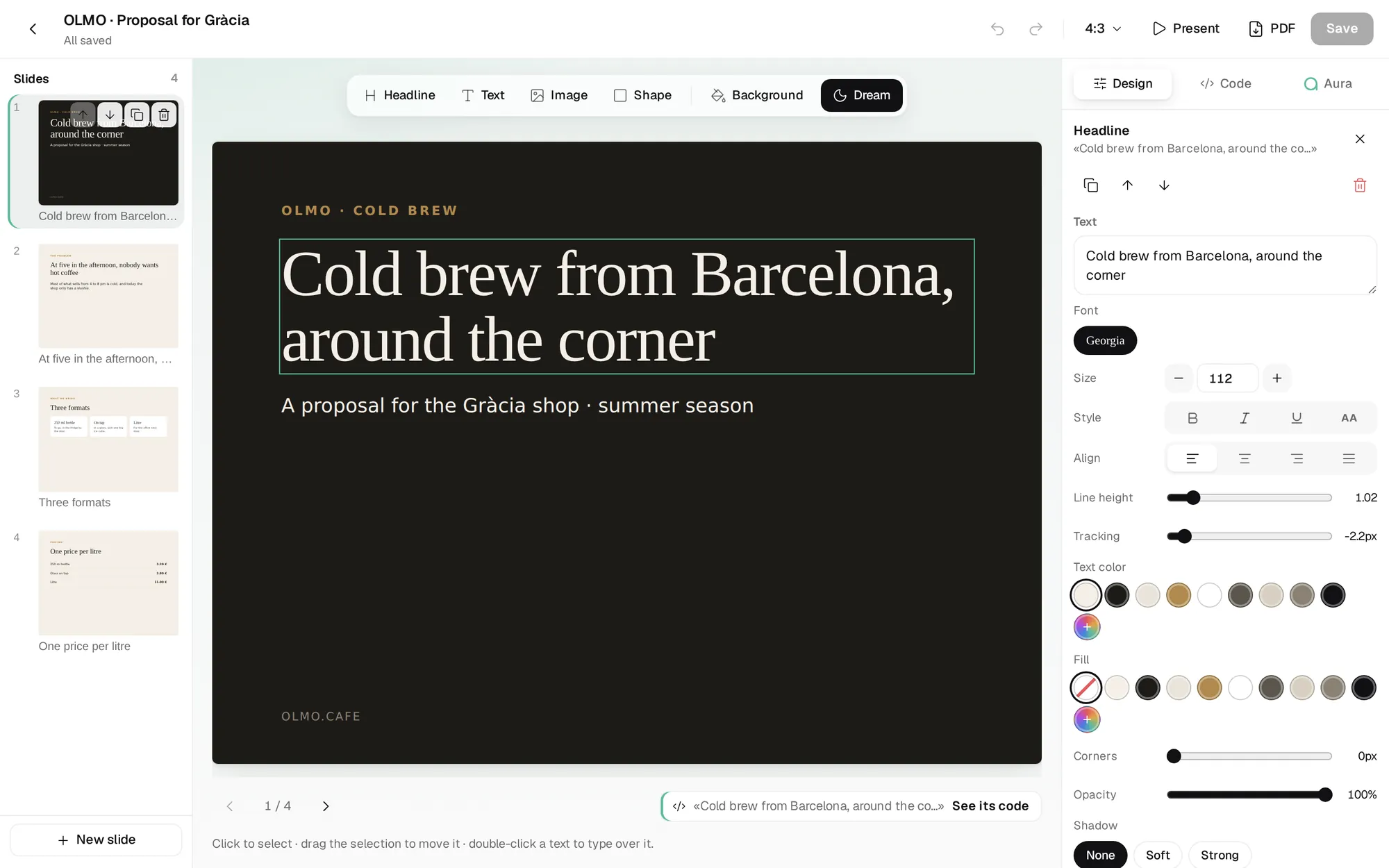
The deck is not an image: it is code, with a viewer in front.
- By hand: click on a text and type over it; move things, change size, colour, background. Add a headline, a generated image or a shape.
- In code: the HTML of each slide, for people who would rather touch the style directly.
- With Aura: ask for a change and it shows it as a proposal in the viewer; apply it or discard it.
- Download: as PDF or PowerPoint. In the PowerPoint every text is an editable box, not a picture.
And if your deck already lives in PowerPoint, Aura Studio opens your .pptx, changes what you ask word by word (the bold on a figure survives a rewrite of the sentence) and hands it back as a .pptx with your template intact.
If you want to roll this out across a whole team, Aether Labs does it department by department, and decks are among the first things that stop being made by hand.
Frequently asked questions
Which AI makes presentations that don't look like templates?
One that generates the style as an image first and then builds the deck from the one you choose. That is what Aura Studio does with GPT Image 2.5.
Can I edit the presentation afterwards?
Yes: by hand in the editor, in the code, or by asking Aura for changes, which it shows you before applying them.
Can I export to PowerPoint?
Yes, and every text stays as an editable box. PDF too.
Can I use my own PowerPoint template?
Yes. Aura Studio opens your .pptx, applies the changes to the file itself and hands it back with its template.
How much does it cost?
Writing the directions is free; each sample slide costs 5 credits (€0.25). Building the deck costs the same as a chat message.